
Scanning
How to scan trading cards with your phone and get a clean match
Light, glare, focus, framing and sleeves decide whether a scan lands on the right card. Here is how to fix each one, and what to do when the first match is the wrong printing.
Published
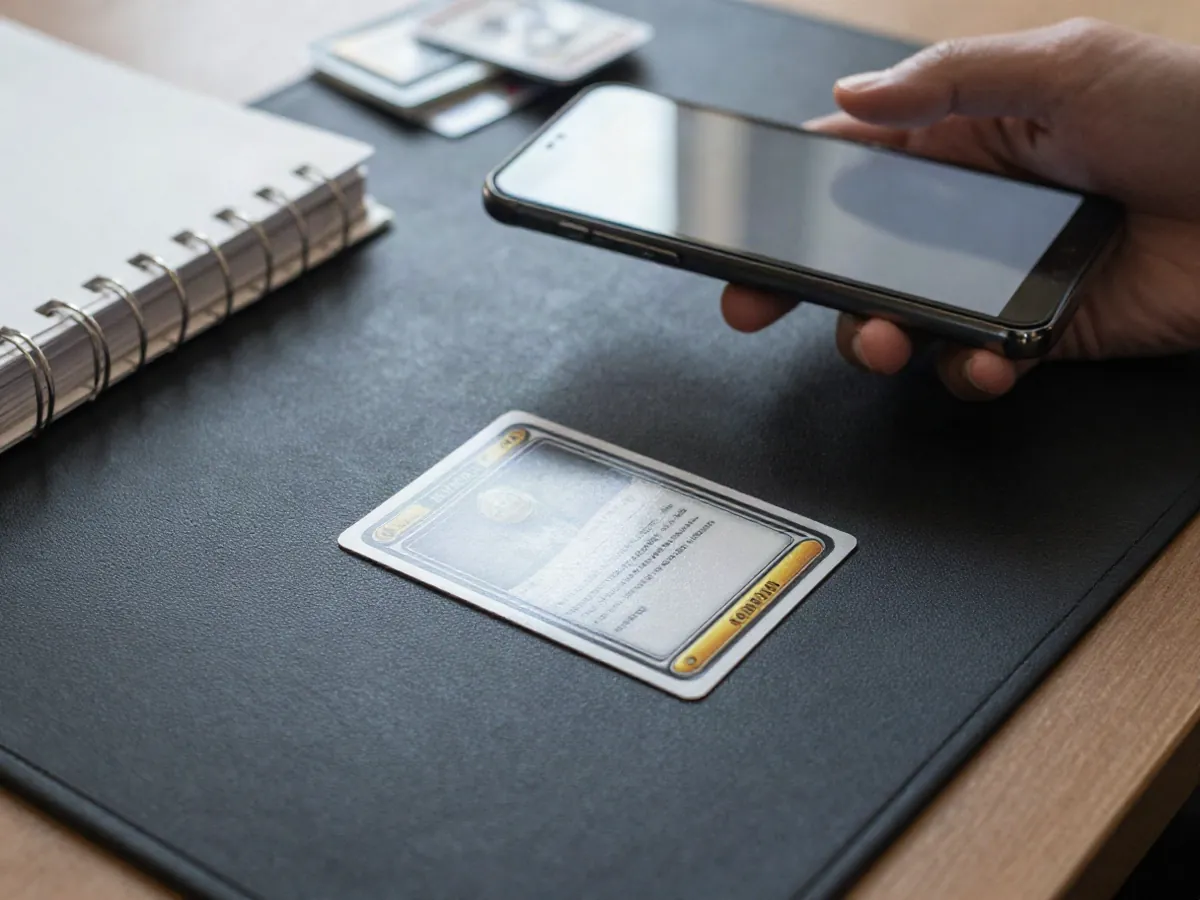
Why a phone scan misses the right card
A scan is only as good as the photo it starts from. The app looks at the artwork, the name line, the set symbol and the collector number at the bottom of the card, then compares them with a catalog of known printings. If any of those areas is washed out by glare, blurred by motion or cut off at the edge, the match becomes less certain, and a similar-looking printing can come up first.
The good news is that almost every bad result traces back to a few habits you can change in seconds. This guide covers light, focus, framing, sleeves and top-loaders, and what to do when the first suggestion is the wrong printing. Any value you see after a scan is a market reference, not an offer or an appraisal.
Lighting and glare: the biggest single fix
Soft, even light beats bright light. Daylight from a window on an overcast day is ideal. Stand so the light comes from the side rather than from behind you, because your own shadow across the card is one of the most common causes of a muddy capture. Avoid a single bulb directly overhead, since it creates a hot spot that hides the text underneath.
Holofoil, reverse holo and textured full-art cards are the hardest, because their surfaces bounce the light source straight back toward the lens. Tilt the card a few degrees, or shift the phone slightly, until the bright band slides off the name line and the number area, then capture. Watch the preview rather than guessing; a streak you can see on screen is a streak the scanner will see too.
- Place the card on a plain matte surface such as a dark mouse pad or a sheet of paper.
- Turn the flash off. It almost always reflects straight back from a glossy card.
- Look at the screen for a shiny streak across the name or number before you capture.
- Keep your hand and the phone's shadow off the card.
Focus and framing: sharp, square and complete
Let the camera finish focusing before you capture. Tap the card on the screen, wait until the text sharpens, and hold still for a second. A distance of roughly a hand-width and a half above the card often works well: too close and autofocus keeps hunting, too far and the small collector number turns into a handful of pixels.
Frame the card square. Keep the phone parallel to the table so the card appears as a clean rectangle instead of a slanted trapezoid. Fill most of the frame, but leave a thin margin so all four edges and corners are visible. A card cropped at the bottom loses the collector number, which is often the detail that separates two printings.
- Capture the whole card, including every corner.
- Rest your elbows on the table, or lean the phone against a stack of books to steady it.
- Wipe the camera lens with a soft cloth. A fingerprint smear adds a haze to every shot.
- Scan one card at a time with nothing else in the frame.
Sleeves, top-loaders and graded cases
A thin clear sleeve usually scans fine. Rigid top-loaders and thick one-touch cases are harder, because the plastic adds its own reflections and any scratches or dust scatter the light. If a scan struggles, tilt the case slightly so the reflection moves off the text, or scan the card before it goes into the holder.
Graded slabs are best photographed at a slight angle to dodge the glare from the flat front. If the scan stalls, you can still identify the card by reading the set name and number from the label and entering them by hand. Never open a sealed graded case just to scan the card inside; it is not worth losing the protection or the grade.
When the first match is the wrong printing
Many cards were reprinted across several sets, often with identical artwork. The differences hide in the set symbol, the collector number, the rarity mark and sometimes a small stamp. If the first match looks right but something feels off, do not accept it yet.
Compare the suggestion with the physical card, then choose the correct printing from the alternatives. If none fits, rescan with less glare and a sharper bottom edge before assuming the card is missing.
- Read the collector number at the bottom of the card, for example 025/165, and compare it with the result.
- Compare the set symbol and the set name shown in the match.
- Check the regulation mark letter on cards that have one.
- Note the finish: holo, reverse holo or non-holo, and the rarity symbol next to the number.
- Look for stamps such as prerelease or promo marks, and confirm the card language.
Common mistakes that cause poor matches
Most unclear results come from the same short list of slips. Check your last few bad scans against it and you will likely spot the pattern.
Before a longer session, run through a quick checklist: lens clean, matte surface, soft light, flash off, phone parallel, collector number visible. Thirty seconds of setup saves a lot of retakes.
- Scanning in dim light with the flash on.
- Cropping the bottom edge so the collector number is missing.
- Letting a patterned tablecloth or a busy playmat into the frame.
- Tilting the phone so the card is skewed.
- Accepting the first result without comparing the number.
- Photographing several cards at once instead of one at a time.
Quick answers
Why does the scan keep suggesting the wrong set? Usually the artwork matches several printings and the number or symbol was not readable. Retake the photo with the bottom edge sharp and glare-free, then compare the collector number with each alternative.
Does the card have to be out of its sleeve? No. A clear soft sleeve is fine for most cards. Switch to a slight tilt or remove the card only if reflections keep blocking the text and it is safe to do so.
Will worn or creased cards still match? Wear usually does not stop identification, but it does matter for condition. Scan to identify the card first, then judge condition separately, since the scan itself cannot grade a card.
Can I scan in the dark? It is better not to. Low light forces the camera to raise its sensitivity, which adds noise to the small text you need. A window or a lamp bounced off a white wall gives a much cleaner result.
Sources and further reading
- Pokémon TCG official site — Background on card sets and how cards are organized.
- TCGplayer Help Center — General guidance on identifying card printings and conditions.
Keep exploring
All blog posts
Pricing cards from a brand-new set: what to expect in the first weeks
Delta Reign is out on 6 November 2026. Here is why early market references are thin, why a new set can be missing from price data, and how to note dates and decide when to wait.
Read article
How to check what a Pokémon card is worth
The value of a Pokémon card depends on the exact printing, its condition and recent sales, not on the name alone. Here is how to identify the card, judge its condition, read a market price reference and avoid the mistakes behind most wrong valuations.
Read article